
If you’ve been living in a code editor for the last few years, you’ve watched AI go from a “fancy autocomplete” to a “junior dev who talks too much.” But in 2026, the vibe has shifted. We aren’t just chatting with AI anymore; we’re deploying Agents.
At the heart of this shift is a new powerhouse from GitHub: Raptor Mini. Quietly rolled out as the “speed demon” of the Copilot lineup, Raptor isn’t just another LLM—it’s the engine driving GitHub’s vision for Agentic AI.
What exactly is Raptor (and Raptor Mini)?
While the name “Raptor” might sound like something out of Jurassic Park, in the GitHub ecosystem, it stands for a specialized, code-first model family. Specifically, Raptor Mini is an experimental model fine-tuned (likely from a GPT-5-mini base) to be the ultimate “editor” rather than a conversationalist.
Unlike general-purpose models that try to write poetry and code with the same brain, Raptor is built for the “Agentic SDLC” (Software Development Life Cycle). It’s designed to handle the heavy lifting of multi-file refactors, workspace audits, and autonomous planning without the “conversational fluff.”
The Specs That Matter:
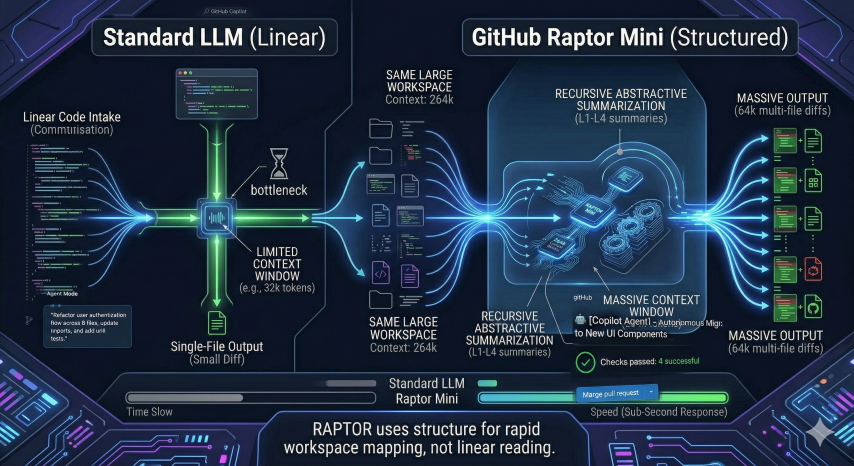
- 264k Context Window: It can “see” your entire project, not just the file you’re working on.
- 64k Output Capacity: It can generate massive diffs and documentation in one go.
- 4x Faster: Compared to “heavy” models like Claude Opus or GPT-5, Raptor is built for sub-second responses and rapid iteration.
Why “Agentic” AI is the New North Star
For years, we’ve used AI reactively (I prompt, it responds). Agentic AI is proactive.
When you switch Copilot to Agent Mode using Raptor, you’re no longer asking for a function. You’re assigning a mission. Instead of saying “Write a regex for emails,” you’re saying:
“Scan
src/components, find every instance of our old Button component, replace it with the new UI library version, update the imports, fix the broken tests, and give me a PR branch.”
Raptor doesn’t just suggest the code; it orchestrates the workflow. It enters an iterative loop: Write -> Test -> Diagnose -> Fix. It doesn’t stop until the goal is met or it hits a wall it needs you to climb.
The Raptor Advantage: Workspace-Wide Brains
Most AI models struggle when you feed them thousands of lines of code. They get “lost in the middle.” Raptor uses a recursive approach to context (similar to the RAPTOR research framework—Recursive Abstractive Processing for Tree-Organized Retrieval) to summarize and navigate large codebases efficiently.
Top Use Cases for Raptor in 2026:
- The Great Refactor: Updating an entire API signature across 40 files in 30 seconds.
- Autonomous PRs: Assigning a GitHub Issue to “Copilot Agent” and watching a branch appear with passing CI/CD checks.
- Security Audits: Using Raptor’s “adversarial” mode to hunt for data-flow vulnerabilities and generate patches before a human even spots the bug.
How to Get Your Hands on It
If you’re a GitHub Pro, Pro+, or Enterprise user, Raptor Mini is already lurking in your VS Code model picker.
- Open Copilot Chat.
- Click the Model Selector (usually at the top or bottom of the chat pane).
- Select Raptor Mini (Preview).
- Try the Agent Mode (or “Edit” panel) to see it actually manipulate your files in real-time.
Final Thoughts: The Teammate You Didn’t Know You Needed
We are moving toward a world where the “Inner Loop” of dev work (writing code) is handled by agents like Raptor, while humans focus on the “Outer Loop” (architectural intent and verification).
Raptor isn’t here to replace you; it’s here to do the boring stuff—the refactoring, the dependency updates, and the “where did I define that interface?” searches—at 4x the speed of sound.
Have you tried Raptor Mini yet, or are you still sticking with the “heavyweight” models for your daily grind?